Data Recovery
Quakertown, PA

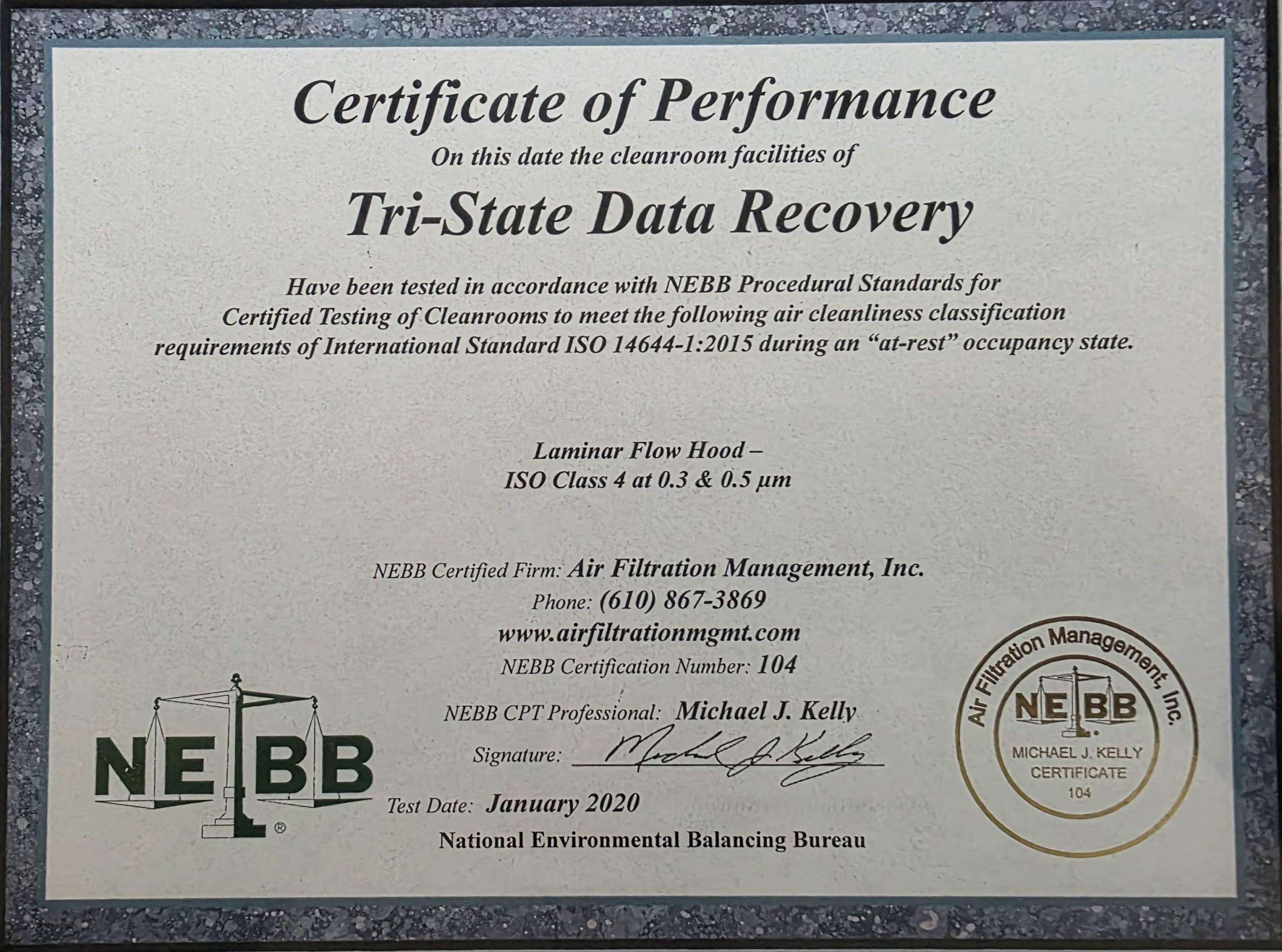
ISO 4
THE CLASS, IN WRITING
FOUR QUESTIONS, ONE PHONE CALL
How to Check a Data Recovery Company
Each one has a document or a name behind it. Ask them of anyone you’re considering, including us.
1. WHICH ISO CLASS IS YOUR CLEAN ROOM?
ISO 14644-1 defines nine classes, 1 to 9, and lower is cleaner — each step roughly a factor of ten. “ISO-certified” without a number tells you nothing; ISO Class 9 is about as clean as an ordinary office. “Class 100” is older still, from a federal standard withdrawn in 2001. Ask for the number, then ask for the certificate that proves it.
2. WHAT PLATFORM ARE YOU CERTIFIED ON?
This work runs on two professional systems, PC-3000 and DeepSpar. Manufacturer certification is a document with a date, a city and a signature on it. “Advanced proprietary tools” and “industry-leading software” are what companies say when there is no certificate to name.
Our answer: Expert-certified on both PC-3000 and DeepSpar, earned in Prague and Ottawa because this trade isn’t taught in the United States
3. WHO PERSONALLY OPENS MY DRIVES AND HAS ACCESS TO MY DATA?
You should get a name, not a department or a case number. If the person doing the work is unreachable by the person paying for it, that becomes a problem at exactly the moment you’d want to ask a question — when something has gone wrong.
Our answer: Don Anderson, and the number at the top of this page reaches him
4. WHERE DOES MY DRIVE PHYSICALLY GO?
A single laboratory answers with one address. If the answer involves a partner facility, a network of labs, or anywhere the person on the phone can’t name, your drive is leaving the region, exposing it to many risks — and the price will have somebody’s margin stacked on the lab’s own fee.
Our answer: Our own Montgomery County laboratory, and nowhere else.
BEFORE YOU DO ANYTHING ELSE
Four Signs to Stop Immediately
Any one of these means the next power-up may be the last one. Unplug it and call.
CLICKING, BEEPING OR GRINDING
The heads can’t read the servo data on the platter and are resetting over and over. Often a head failure rather than platter damage, which means frequently recoverable — but only if the drive stops now. Every cycle risks contact with the recording surface.
SPINNING UP, THEN STOPPING
A repeated spin-and-stall usually means the drive can’t complete its own start-up checks. Left plugged in it will keep trying, and each attempt is another chance for something mechanical to go from damaged to destroyed.
DROPPED, WET, OR THROUGH A POWER SURGE
Physical shock and liquid both cause damage that isn’t visible from outside, and corrosion continues long after a drive looks dry. Don’t test it, don’t apply heat, don’t open it. Seal it in a bag and call — water cases are the most time-sensitive we handle.
NOT DETECTED, OR THE WRONG CAPACITY
A drive that doesn’t appear at all, or appears with a size that isn’t its own, is usually a firmware or electronics fault rather than a file problem. Recovery software can’t reach it and will spend the drive’s remaining life trying.
EXPERIENCE THE DIFFERENCE
Software on a Failing Drive, or a Controlled Recovery
UPPER BUCKS RUNS ON SINGLE MACHINES
The Office Computer That Is Also the Business
The serious cases that reach us from up here have a shape. A farm office. A small manufacturer off 309. A family business three generations in. The accounts, the customer list, the supplier records and twenty years of paperwork all live on one computer, and nobody ever imaged it because nobody ever had to.
When that machine stops, it isn’t an IT problem — it’s the whole business standing still. Which is exactly the situation where things get worse, because the pressure to get in right now leads to powering it on again and again. Say on the first call that the business is stopped and the case goes to the front of the bench.
Practically: stop trying to boot it. Pull the drive if you can do that safely, or bring the whole machine and we’ll take it out here. Everything is imaged before anything else is attempted, so the original is never the thing being worked on — and if there are older backup drives in a cupboard, bring those too. More than once the fastest route back has been a five-year-old external nobody remembered.
WHAT WE RECOVER
The Cases That Need a Clean Room and Expert Skill
Hard Drive Recovery
Hard drives that are clicking, seized and beeping from a drop; head crashes, firmware faults and bad sectors caused from media damage. Weak or faulty head assemblies replaced with precision-matched donor parts inside our certified clean rooms.
SSD & NVMe Recovery
These devices degrade while in use and develop bad sectors , firmware corruption and some times require NAND-level recovery on solid-state drives that are no longer recognized. Degraded NVMe drives require specialized hardware, not a software license.
RAID, NAS & Servers
Failed rebuilds, simultaneous drive failures and degraded arrays for practices and firms. Drives bought together fail together, which is why the rebuild rather than the first failure usually ends an array.
WATER & STORM DAMAGE
Drives fried from a power surge or drives out of flooded basements and outbuildings. Corrosion continues long after the outside is dry, so these are the most time-sensitive cases we handle. Don’t power it on — seal it in a bag and call.
Apple & Mac Devices
Macs and MacBooks with a removable SSD or hard drive, Fusion Drives, iMacs, and the MacBook models that carry Apple’s data-recovery (“lifeboat”) connector. Also Airport Time Capsule and LaCie external drives. We don’t perform board repairs on current MacBooks with soldered storage — we’ll tell you that on the first call rather than after we have your machine.